



ASUS Chromebook Flip CX1 Review: Is This 14-Inch 2-in-1 Worth It?
The ASUS Chromebook Flip CX1 is the kind of laptop that makes sense the moment you know what you need it for. If you want a simple machine for browser-based work, Google apps, streaming, light multitasking, and the occasional touchscreen convenience, it checks a lot of practical boxes. If you want to edit large video files, run heavyweight Windows software, or keep dozens of demanding tabs and apps open without a second thought, this is the wrong tool.
That distinction matters more than any headline spec.
On paper, the Flip CX1 offers a 14-inch Full HD touchscreen, a 360-degree hinge, 8GB of RAM, 128GB of eMMC storage, Wi‑Fi 6, and a lightweight build at 3.59 pounds. That sounds balanced rather than flashy, and that is exactly how this Chromebook should be judged. It is not trying to be a premium performance laptop. It is trying to be an easy everyday computer that bends into different modes, lasts through a workday, and stays uncomplicated.
The core takeaway
The ASUS Chromebook Flip CX1 is best for buyers who live mostly in Chrome, Google Docs, YouTube, email, cloud storage, and Android apps. Its strongest selling points are the roomy 14-inch display, the flexible convertible design, and the useful bump to 8GB of RAM, which helps ChromeOS feel less cramped during normal multitasking.
The catch is the Intel Celeron N4500 processor. It is fine for light work, but it sets the ceiling. This is a laptop for steady, low-friction computing, not heavy-duty performance.
What the hardware actually feels like in daily use
A lot of budget laptops look acceptable on a spec sheet and then feel cramped or cheap in motion. The Flip CX1 avoids some of that by focusing on comfort and flexibility.
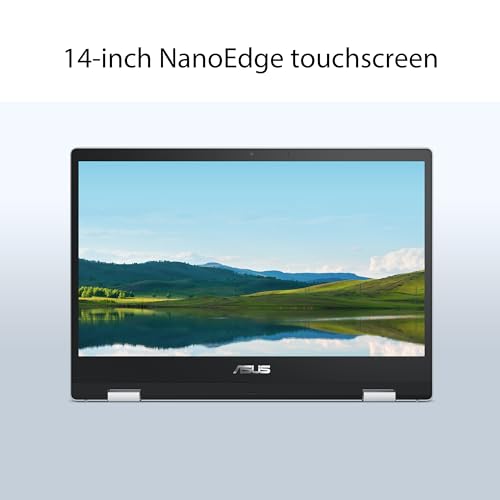
The 14-inch 1920x1080 display is one of the first things that makes it easier to live with than many smaller Chromebooks. A 14-inch screen gives you noticeably more breathing room than 11.6-inch and 12-inch models. In practice, that means less squinting when you have a document open next to a browser window, bigger text at comfortable scaling, and a better experience for movies or long reading sessions. Full HD also matters here: text tends to look sharper, spreadsheets look less jagged, and streaming video feels more at home on a panel this size.
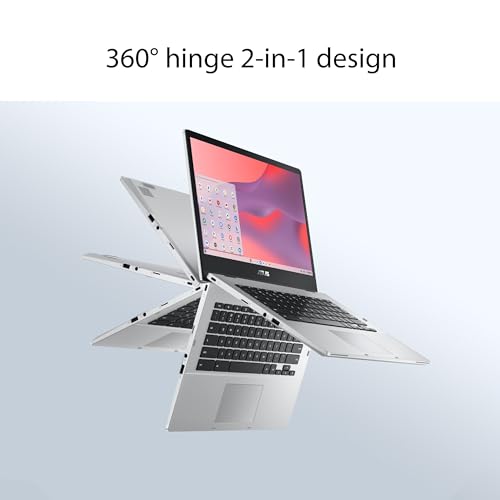
The 360-degree hinge is not just a marketing flourish. It changes where and how you use the device. In clamshell mode, it works like a normal laptop for typing and browsing. In tent mode on a kitchen counter or airplane tray, it is easier to tap through a recipe, watch a show, or join a video call without the keyboard taking up space. Stand mode is handy when you want the screen closer and the keyboard out of the way. Tablet mode is the least laptop-like of the four, but still useful for casual reading, sketching rough notes with touch, or passing the screen across a couch.
At 3.59 pounds, it is portable without feeling featherlight. You will notice it in a backpack, but not in a way that makes it burdensome for school, commuting, or moving from room to room. This is an important middle ground: big enough to be comfortable, light enough to stay mobile.
Where this Chromebook fits best
Scenario 1: The student or casual home user
Picture a weekday morning at a dining table with coffee on one side and a notebook on the other. You have Gmail open, a Google Doc for class notes, a couple of research tabs, and maybe Spotify or YouTube playing quietly in the background. This is exactly the type of workload the Flip CX1 is built for.
The 8GB of RAM helps more than many buyers realize. On a lower-memory Chromebook, a handful of tabs and an Android app can start to feel tight, especially if you bounce between assignments, messaging, and streaming. With 8GB, ChromeOS usually has more room to stay responsive during ordinary multitasking. It does not turn the Celeron chip into a speed demon, but it makes everyday use smoother and less fragile.
For students who mainly submit assignments through web portals, write papers in Google Docs, attend video calls, and stream lectures, this laptop makes sense. The touchscreen can also be useful in quick interactions, especially when flipping into stand mode on a desk with limited space.
Scenario 2: The living-room and kitchen laptop
Some laptops spend their whole life at a desk. This one is better thought of as a shared household machine. Imagine it propped in tent mode on a kitchen island while someone scrolls through a recipe with flour on their hands, or set in stand mode on a side table for casual streaming while folding laundry.
That is where the convertible design earns its keep. A basic non-touch clamshell laptop can do the same tasks, but not with the same flexibility. The CX1 feels suited to spaces where you are not always sitting upright at a desk. The Full HD display helps here too: shows, tutorials, and web video simply feel more pleasant on a 14-inch 1080p panel than on a smaller, lower-resolution budget machine.
Scenario 3: The commuter or light travel machine
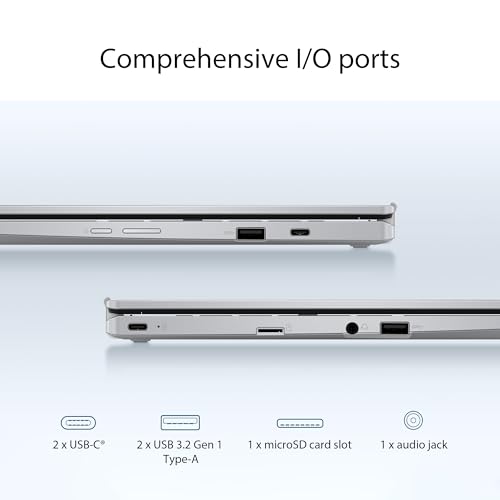
For train rides, campus shuttles, airport waiting areas, and coffee shop sessions, the CX1 has a pretty practical layout. Wi‑Fi 6 is a nice quality-of-life feature for crowded networks, and the port selection is genuinely useful: USB-C with display and power delivery support, USB-A for older accessories, and a microSD card slot.
That means fewer dongle problems than you might expect from a slim laptop. Plugging in a flash drive, connecting a mouse, charging through USB-C, or expanding storage for downloaded media is straightforward. If you are the kind of buyer who still uses older USB accessories, having USB-A ports saves hassle.
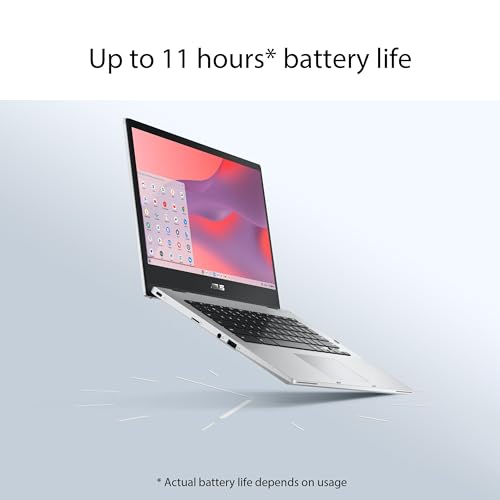
Battery life is rated at up to 11 hours, and while real-world results always depend on brightness, tabs, video use, and Android apps, that figure suggests the laptop is intended for all-day light use. In practical terms, this is the kind of device you buy because you do not want to hunt for an outlet during every short outing.
The trade-offs you need to accept
The most important buying decision here is whether you can live within ChromeOS and entry-level CPU performance.
The Intel Celeron N4500 is a modest chip. For web browsing, documents, email, streaming, and light multitasking, it should be adequate. But there is a difference between adequate and effortless. If your workload includes lots of open tabs with heavier web apps, frequent Zoom or Meet calls while multitasking hard, or Android apps that are not well optimized, you may start to feel the limits.
The 128GB eMMC storage is another example of “good enough with context.” Capacity-wise, 128GB is solid for a Chromebook because ChromeOS encourages cloud-first use. The eMMC part is the compromise. It is typically not as snappy as faster SSD storage found in more premium machines. In day-to-day use, that can show up in app launching, larger file transfers, or system responsiveness under heavier loads. For a casual Chromebook, this is not a dealbreaker, but it is part of why the laptop belongs in the practical tier rather than the enthusiast tier.
Tablet mode is also best understood as a bonus, not a replacement for a dedicated tablet. A 14-inch convertible at 3.59 pounds is usable in tablet mode for short sessions, but it is not the kind of one-hand couch tablet most people imagine. It works better on your lap, on a table, or when propped up than it does held for long reading stretches.
Who should buy it
The ASUS Chromebook Flip CX1 is a smart buy for:
- Students who work mostly in browser tools and Google apps
- Families who want one flexible household laptop for light everyday use
- Remote workers with simple cloud-based workflows
- Buyers who value a bigger screen over ultra-compact size
- Anyone who wants a touchscreen Chromebook without stepping into premium pricing tiers
Its best feature set is the combination of 14-inch Full HD screen + 2-in-1 hinge + 8GB RAM + useful ports. That combination makes it feel more livable than ultra-cheap Chromebooks that cut too many corners at once.
Who should skip it
You should pass on this model if any of the following sound like you:
- You need Windows or Mac software for work or school
- You edit video or photos beyond light, casual use
- You keep dozens of heavy tabs open while multitasking on calls
- You want a true tablet experience for long handheld sessions
- You care more about raw speed than flexibility
In those cases, a stronger Chromebook Plus model, a midrange Windows laptop, or a tablet-and-keyboard combo may be a better fit.
What stands out more than the headline specs
The MIL-STD 810H durability claim is worth noting not because it makes the laptop indestructible, but because it suggests ASUS built it with real-world knocks in mind. For students, families, or anyone carrying a laptop between rooms, that matters more than polished marketing language. A budget-friendly machine that feels too delicate is stressful to own. A machine that feels meant to survive ordinary life is easier to recommend.
ChromeOS is another understated advantage. If you are buying for someone who does not want to manage antivirus pop-ups, driver fuss, or a cluttered desktop environment, ChromeOS remains one of the least intimidating laptop platforms. It starts quickly, works well with Google services, and generally stays simple. That simplicity is not exciting, but it can be exactly what makes a laptop get used instead of abandoned.
The included Google One AI Premium trial is a nice extra if you already live in Google's ecosystem, though it should be treated as a bonus rather than the reason to buy. The real value of this machine is the hardware fit and the operating system experience.
Final verdict
The ASUS Chromebook Flip CX1 is worth it if you want an uncomplicated 14-inch convertible for browsing, schoolwork, streaming, and light productivity. It gets the fundamentals right in a way many budget laptops do not: a comfortable screen size, touch support, flexible hinge, respectable memory for the class, modern wireless connectivity, and a port selection that does not force you into adapter life.
Its limitations are also clear. The Celeron processor sets expectations, and the 2-in-1 design adds convenience more than luxury. This is not for power users, creators, or anyone who needs a full desktop-class workflow.
But for the buyer who wants a reliable ChromeOS machine for everyday tasks, especially one that can move easily between desk, couch, kitchen counter, and backpack, the Flip CX1 is a sensible, functional choice.
If your computing life happens mostly in the browser and you like the idea of a larger-screen Chromebook that can bend into multiple modes, this is the kind of laptop that feels useful every day rather than impressive only on paper.