
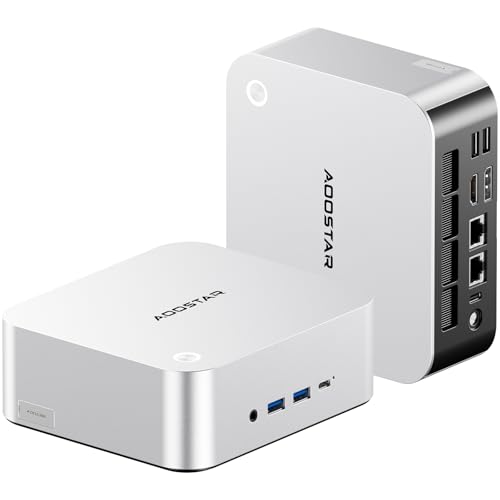
AOOSTAR MACO AMD Ryzen 7 H255 Mini PC Review: Worth It for Gaming and Work?
The AOOSTAR MACO H255 is the kind of mini PC that tries to win you over with one very clear promise: desktop flexibility without a desktop-sized box. On paper, it has a lot going for it. You get an 8-core, 16-thread Ryzen 7 H255 processor, Radeon 780M graphics, 24GB of DDR5 memory, a 1TB PCIe 4.0 SSD, dual USB4, dual 2.5G LAN, support for up to four 4K displays, and the unusual headline feature here: OCuLink for external GPU expansion.
That combination makes this more interesting than the average tiny office PC. It is trying to sit in the space between a quiet home-office machine, a compact creator box, and a mini gaming desktop that can grow later.
The short version: if you want a very small PC that already feels fast for everyday work and light-to-moderate gaming, while leaving the door open for an eGPU setup later, the MACO H255 is easy to take seriously. If you want plug-and-play high-end gaming with no caveats, or you know you will never use its advanced ports, there are simpler machines worth considering.
What actually makes this mini PC different
A lot of mini PCs blur together once you strip away the marketing. They often offer a mobile-class processor, decent integrated graphics, a small footprint, and just enough ports to get by. The AOOSTAR MACO H255 stands out because its features are not just about raw speed; they are about headroom and versatility.
The Ryzen 7 H255 gives you 8 cores and 16 threads with boost speeds up to 4.9GHz. In normal use, that translates less to bragging rights and more to a specific feeling: Windows should feel snappy even with too many browser tabs open, a music stream running, Slack or Teams in the background, and a big file extraction or photo export happening at the same time. It is the kind of processor that makes a compact PC feel less like a compromise.
The included 24GB of DDR5 also matters more than the number first suggests. This is a comfortable amount for people who multitask heavily, keep creative apps open, or split the machine across work and entertainment. It is enough that the system should feel relaxed rather than cramped. The 1TB PCIe 4.0 SSD should also keep booting, app launches, and large project loading feeling quick, instead of introducing the subtle delays that make cheap PCs feel disposable.
But the biggest differentiator is the port layout. Dual USB4 and OCuLink on the same small machine is unusually ambitious. USB4 helps with fast storage, docks, and modern peripherals. OCuLink is the enthusiast feature: it gives you a more direct path to an external GPU setup than the usual general-purpose connection. If you are the sort of buyer who likes buying once and upgrading later, that matters.
How it feels in real use
This is not the sort of mini PC you buy only to hide behind a monitor and forget. It is better thought of as a compact command center.
Picture a small apartment desk where every inch matters. You have a keyboard tucked under a monitor arm, maybe studio speakers squeezed beside a display, and no interest in putting a bulky tower on the floor. The MACO H255 makes sense here because it gives you a clean, minimal footprint while still offering enough rear I/O to behave like a serious desktop. The metal body also helps it look like something that belongs in a tidy workstation instead of a temporary setup.
In that kind of environment, four-display support is not just a bullet point. Even if you never use four screens, having HDMI, DisplayPort, and dual USB4 video output gives you flexibility. Maybe today you run a single ultrawide. Six months from now, you add a vertical monitor for documents or code. A year later, the same machine ends up on a trading desk, a home office, or a family media workstation. It is a small box with unusually few obvious dead ends.
There is also a second scenario where this machine makes more sense than a standard tower: a shared family or mixed-purpose room. Imagine it on a shelf in a living room office corner. During the day it handles spreadsheets, browser work, remote meetings, and document scanning. At night it becomes a couch-adjacent media machine, emulator box, or casual gaming system connected to a TV. Because it is small and relatively unobtrusive, it fits spaces where a gaming tower would feel visually loud.
Then there is the enthusiast scenario. A buyer who starts with integrated graphics today but likes the idea of adding more GPU power later is exactly who should pay attention here. Radeon 780M graphics are meaningful because they move this beyond “office PC with video output” territory. For lighter gaming, older titles, esports-style games, indie games, and many everyday GPU-accelerated tasks, integrated graphics at this level can be genuinely usable. But if your needs grow, the OCuLink port changes the conversation. Instead of replacing the whole computer, you can build around it.
Where the AOOSTAR MACO H255 makes the most sense
The best buyer for this system is someone who wants one compact machine to do several jobs reasonably well.
If you are a programmer, analyst, or remote worker with a two- or three-monitor setup, the CPU, RAM, networking, and port selection are probably more important than flashy gaming claims. Dual 2.5G LAN is especially appealing if your setup includes network-attached storage, lab hardware, routing experiments, or simply a preference for wired reliability. Most mini PCs stop at basic connectivity. This one is clearly designed for buyers who actually notice I/O.
If you are a hobbyist creator, the 8-core processor and fast storage should make editing workflows, asset management, and multitasking feel much more comfortable than on budget compact systems. It will not replace a large desktop workstation for sustained heavy rendering, but it should make photo work, 4K media handling, and general project management feel very viable in a tiny footprint.
If you are a casual-to-midrange PC gamer, the interesting thing here is not just the Radeon 780M. It is that the machine can start as an all-in-one small gaming setup and later become the brains of a more serious build. That makes it easier to justify than a mini PC that tops out the day you unbox it.
Who should skip it
This is not the right buy for everyone.
If your goal is maximum gaming performance right now, and you already know you want high settings in demanding new AAA titles, a mini PC with integrated graphics is probably not your cleanest route. Yes, the OCuLink expansion is exciting, but adding an external GPU means added complexity, extra hardware, more cables, and more total cost. If your end goal is obvious from day one, a conventional gaming desktop may be the simpler answer.
You should also skip this if your usage is basic enough that you will never benefit from the higher-end connectivity. If all you need is web browsing, streaming, email, and light document work on one screen, a less ambitious mini PC will likely feel similar in day-to-day use. The MACO H255 is best when its extra flexibility will actually get used.
Finally, if you dislike tinkering, be honest with yourself about the eGPU angle. OCuLink is a real advantage for the right user, but it is not a magic button. The value is in the option, not in the guarantee that every buyer will want to build around it.
The trade-offs that matter
The biggest trade-off is simple: you are paying for a compact system with premium connectivity, not just for raw frame rates.
That means some buyers will love it and some will wonder why not just buy a bigger desktop. The answer depends on space, noise expectations, upgrade strategy, and how much you value a clean setup.
Compared with a cheaper office-focused mini PC, the MACO H255 gives you much stronger graphics potential, faster-feeling memory and storage, and a far more future-facing port selection. What that feels like in practice is less waiting, more headroom, and fewer “I guess I need a new computer now” moments.
Compared with a similarly priced traditional desktop, the compromise is expandability inside the box. A tower can usually take standard internal GPUs, more elaborate cooling, and easier internal upgrades. The AOOSTAR answers that limitation by offering OCuLink and generous external connectivity instead. So the decision is not “which is better,” but rather which upgrade path you prefer: internal parts in a large chassis, or external flexibility in a tiny one.
Another trade-off is thermal behavior under heavy sustained load, which is always part of the mini PC conversation. AOOSTAR highlights its cooling system, and that is reassuring, but physics still matters. A tiny enclosure can absolutely be fast, but it usually reaches that speed with less thermal slack than a full-size tower. For bursty work, that often does not matter. For long gaming sessions, long renders, or all-day compute tasks, it matters more.
Small features that are easy to overlook
The fingerprint reader is not the most glamorous feature, but on a daily-use PC it can be one of the nicest. If this machine lives on a desk where you log in and out constantly, one-touch unlocking removes a little friction every single day. The same goes for front-access ports. A compact system becomes much more livable when you do not have to reach behind it every time you plug in a flash drive, headset dongle, or portable SSD.
The dual M.2 and storage expansion support also deserve more attention than they usually get. Many compact systems feel roomy on day one and cramped a year later. If you keep a local media library, install large games, store camera footage, or use virtual machines, storage flexibility is the difference between a PC that ages well and one that becomes annoying.
So, is the AOOSTAR MACO H255 worth it?
Yes, for the right buyer.
The AOOSTAR MACO H255 is most compelling when you see it as a compact premium foundation, not just a tiny box with a long spec list. Its appeal is the combination of strong everyday CPU performance, respectable integrated graphics, generous RAM and SSD capacity out of the box, excellent monitor support, and unusually advanced connectivity for future expansion.
If your priorities are a small footprint, fast multitasking, multi-monitor productivity, and the option to move into eGPU territory later, it is a smart kind of mini PC. If your needs are simpler, its strengths may be wasted. If your gaming ambitions are much bigger from the start, a standard desktop may be the more direct path.
For buyers who want a tiny desktop that does not corner them later, this is exactly the kind of machine that makes sense.
Final verdict
The AOOSTAR MACO AMD Ryzen 7 H255 Mini PC is best for buyers who care about desk space but do not want to give up serious desktop behavior. It should feel quick in daily work, flexible in a multi-monitor setup, and unusually upgrade-friendly for a mini PC thanks to OCuLink.
The catch is that its best feature is also its most niche one. If the expansion path and advanced connectivity appeal to you, the MACO H255 is easy to recommend. If not, you may be paying for capabilities you will never touch.
That makes this a strong choice for power users, home-office multitaskers, compact-setup enthusiasts, and gamers who like the idea of starting small and scaling up later.